Remote Desktop Pinned Tab




























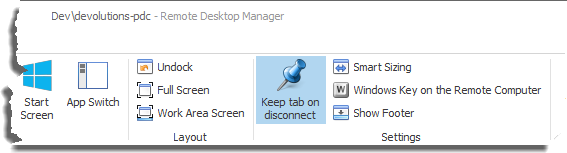


















Access our comprehensive Remote Desktop Pinned Tab database featuring comprehensive galleries of professionally captured photographs. enhanced through professional post-processing for maximum visual impact. providing reliable visual resources for business and academic use. Each Remote Desktop Pinned Tab image is carefully selected for superior visual impact and professional quality. Perfect for marketing materials, corporate presentations, advertising campaigns, and professional publications All Remote Desktop Pinned Tab images are available in high resolution with professional-grade quality, optimized for both digital and print applications, and include comprehensive metadata for easy organization and usage. Our Remote Desktop Pinned Tab collection provides reliable visual resources for business presentations and marketing materials. Multiple resolution options ensure optimal performance across different platforms and applications. The Remote Desktop Pinned Tab collection represents years of careful curation and professional standards. Our Remote Desktop Pinned Tab database continuously expands with fresh, relevant content from skilled photographers. The Remote Desktop Pinned Tab archive serves professionals, educators, and creatives across diverse industries. Diverse style options within the Remote Desktop Pinned Tab collection suit various aesthetic preferences. Each image in our Remote Desktop Pinned Tab gallery undergoes rigorous quality assessment before inclusion. Professional licensing options accommodate both commercial and educational usage requirements. Whether for commercial projects or personal use, our Remote Desktop Pinned Tab collection delivers consistent excellence.